Before you type a card number into a free trial, check three things. What kind of free it really is. How long the clock runs. And what happens the morning after it ends.
The answers are all on the page. Most people just never scroll that far.
That is the whole trick of a well-built trial. It does not need to hide anything. It only needs you to be busy.
That is the whole problem. Companies rarely hide the terms outright, because that gets them sued. But they do stack the details one or two clicks past the button that starts the trial, on a page nobody opens. The check is easy. Skipping it is easier.
Three kinds of “free,” and only one of them ends
Almost every offer called free is one of three things, and the three behave nothing alike.
A free trial is the full product with a timer. You get everything, the timer runs out, and billing starts unless you cancel first. A free tier is a permanent stripped-down version. It never expires, but it never grows up either. Freemium is the messy middle, a free tier that keeps nudging you toward the paid one.
The difference decides where your risk sits. A trial goes after your card. A free tier goes after your patience. Freemium goes after both, slowly, for years.
| What it is | Ends? | Card needed? | What to watch |
|---|---|---|---|
| Free trial | Yes, on a date | Usually | The renewal price after the trial |
| Free tier | No | No | Hard limits, no way up |
| Freemium | No | No | Feature walls and watermarks |
So the first move is not to compare prices. It is to work out which of the three you are looking at. Everything else follows from that.
But not every free offer is a trial, and the ones that are behave differently by length. Seven days is built for consumers, and it assumes you will forget. Thirty days is built for teams, and it assumes payroll will weigh in. A long trial is not a gift. It is a longer runway to the same renewal.
If a service also has a free tier, start there. You learn the product without a clock, and you find out whether the paid features are ones you would really use. A trial only makes sense once the free version has told you that you want more.
Where to look, and what to set up before you click
There are three places worth checking, in this order. The second one is the honest one.
Start with the pricing page. Look for the line about what happens after the trial ends. If the page shows a monthly price but never names the trial’s length, that silence is information too.
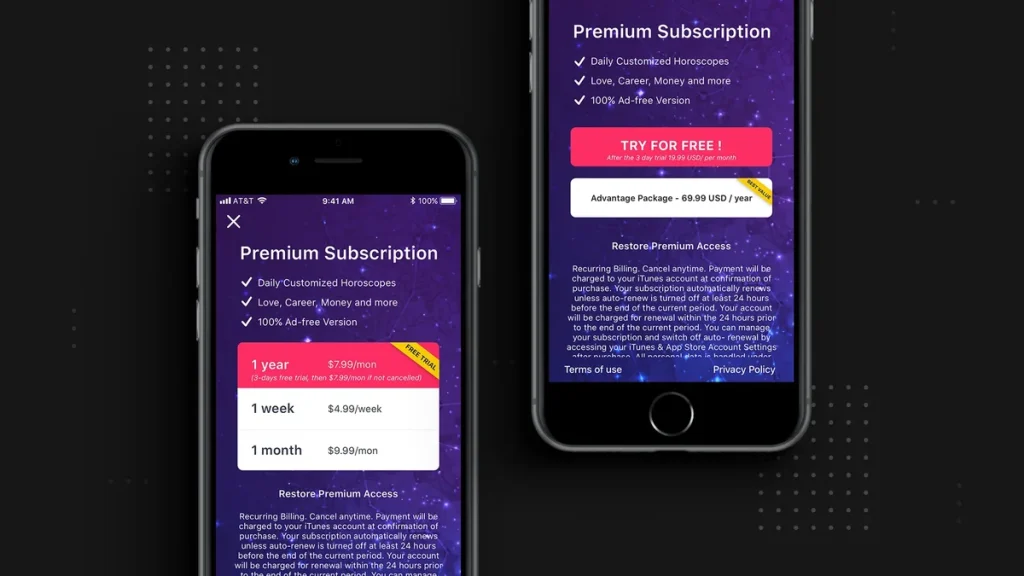
Then open the app store listing. Apple and Google both require developers to publish the renewal price inside the listing, which makes it harder to fudge than a marketing page. Google’s own help page says you will get an email before a trial ends, and that you have to cancel before it expires to avoid the charge.
Apple puts a number on it. Its support page tells users to cancel at least 24 hours before the trial ends if they do not want to be billed.
The third place is the account page. It is the one people forget. After you sign up, the subscription manager shows the exact renewal date and amount. On an iPhone that is Settings, your name, then Subscriptions. On Android, it is the Play Store, then Subscriptions.
There is a fourth thing that hides in plain sight, and it is not on any of those pages. Pre-checked boxes.
A box that is already ticked when you reach checkout can mean you agreed to a second subscription, or to a yearly plan, or to sharing your details with partners. The FTC’s guide to free trial offers is blunt about this. If the box is pre-checked and you do not agree with it, uncheck it before you pay.
One more thing worth knowing before you cancel anything. Cancelling a trial does not always let you keep using it until the end.
Apple usually keeps your access running until the period you already claimed, which for a trial means the trial days. Google Play’s terms say the opposite. Cancel a trial there and you can lose access right away, before the free days are used up. Same word, two different endings.
That changes the timing. On an iPhone you can cancel on day one and still use the full trial. On Android, cancelling early may lock you out of days you already had. So check which store you signed up through before you hit cancel.
There is also a scam layer that has nothing to do with the company you think you are signing up with. Many ads for free trials are placed by affiliate marketers, who get paid per click and sometimes per signup. The FTC warns that these ads can oversell what you get. Sign up on the company’s own site, not from an ad.
Now the honest part. Whether you leave a card is a tradeoff, not a mistake either way.
Leaving one gets you the full trial and a smoother signup. But it also leaves your own memory as the only thing between you and a charge. Skipping it keeps you safe, and it rules out most trials, because the card is how a company proves you are a real customer.
My read: if a trial runs seven days, do not leave a card unless you can set the reminder in the same minute. A month is different. A month is long enough to actually decide.
The number on the trial button is also rarely the number you will pay later. A trial is usually free, the renewal is usually full price, and the two sit on different lines. Read the renewal line. That is the price you are actually agreeing to.
And some offers that read like a trial are not free at all. Watch for a small first payment that jumps to full price after a set period. That is a discount wearing a trial’s clothes, and the low opening number is doing the work of hiding the real one.
One last pattern. Trials that roll into annual plans are the expensive ones. A monthly renewal you miss costs one month. An annual renewal you miss costs twelve, and plenty of services default to annual when you start a trial. If the terms mention a yearly price, the reminder stops being optional.
If you are already inside a trial and cannot remember when it ends, do not guess. Search your email for the receipt. Apple’s support page suggests looking for “receipt from Apple,” then checking which account the receipt names, because the subscription lives under whichever account bought it. Google sends a warning email before a trial ends, so the same search works there.
If you decide the trial is not worth keeping, cancel it while the account is still open in front of you. Standing in the settings screen with the renewal date visible is the easiest moment you will ever get. I walked through the platform-by-platform version in how to cancel a subscription, because the steps change by store and by whoever actually bills you.
So the check comes down to three lines you can read in about a minute: how long the free period lasts, what the price becomes after it, and when you have to act to stop it. If any of those three is missing, treat that as your answer.