Every VTuber channel starts with the same quiet decision. Which program do I open? Most people assume the answer costs money. So they budget a few hundred dollars before drawing a single line.
VRoid Studio is why that budget is optional. It is a free 3D character program from pixiv. The models it exports run on a wide range of avatar platforms, and the license underneath it is far more permissive than the price suggests.
That is the pitch. It holds up.
But the pitch leaves out the useful part. The software is free, the meshes inside it belong to someone else, and pixiv quietly changed part of the deal this year.
What the download actually asks of you
VRoid Studio is free to use for anyone, in pixiv’s own wording. There is no paid tier hiding behind a trial. You download an installer for Windows or macOS, or grab the iPad app. No account gate stands between you and the first character.
The official floor is modest. An Intel Core i5 from the sixth generation will do, or a Ryzen 5 from the third. You need 8 GB of RAM, Intel Iris 540 graphics, and 10 GB of disk. Macs want macOS 11 on a 2015 model or newer. The iPad version wants iPadOS 15 on a 2018 model or newer.
Those numbers are low enough that most laptops clear them. When a machine struggles, the cause is usually graphics memory rather than processor speed. A computer that runs a modern browser without complaint will run this.
One thing did change in April 2026. pixiv announced advertising banners inside both the desktop and iPad versions. The framing was funding long-term operation of the service. An option to hide those banners is planned, though timing and any pricing attached to it were not published with the announcement.
Nothing has been removed from the free tier. But “free forever, no strings” is no longer a safe assumption to build a channel around. Plan for the software to ask for something eventually.
Start with the body, then the face
New projects open on a base body. This is the first place beginners lose an hour. The presets are not a style choice. They are a starting skeleton.
Pick the proportions nearest your character’s height and build, then work the sliders. VRoid exposes more than ten parameters per feature.
That reads like marketing copy until you notice how much of a character comes from small offsets. Jaw width. The gap between the eyes. The thickness of an upper lid.
Faces are where the tool is strongest. Eye shape, iris pattern, lashes, brows and mouth are separate editable parts. Each one carries its own texture layer. And because you can paint directly on the 3D surface inside the editor, a blush or a scar lands on the model while you watch.
That direct painting is what separates VRoid from a general 3D package. It is also why illustrators who have never touched a polygon get something usable in an afternoon.
Eyes deserve more time than the rest of the face combined. At stream resolution the iris is roughly forty pixels wide. Everything a viewer reads as personality lives in that circle.
Hair is where an avatar stops looking generic
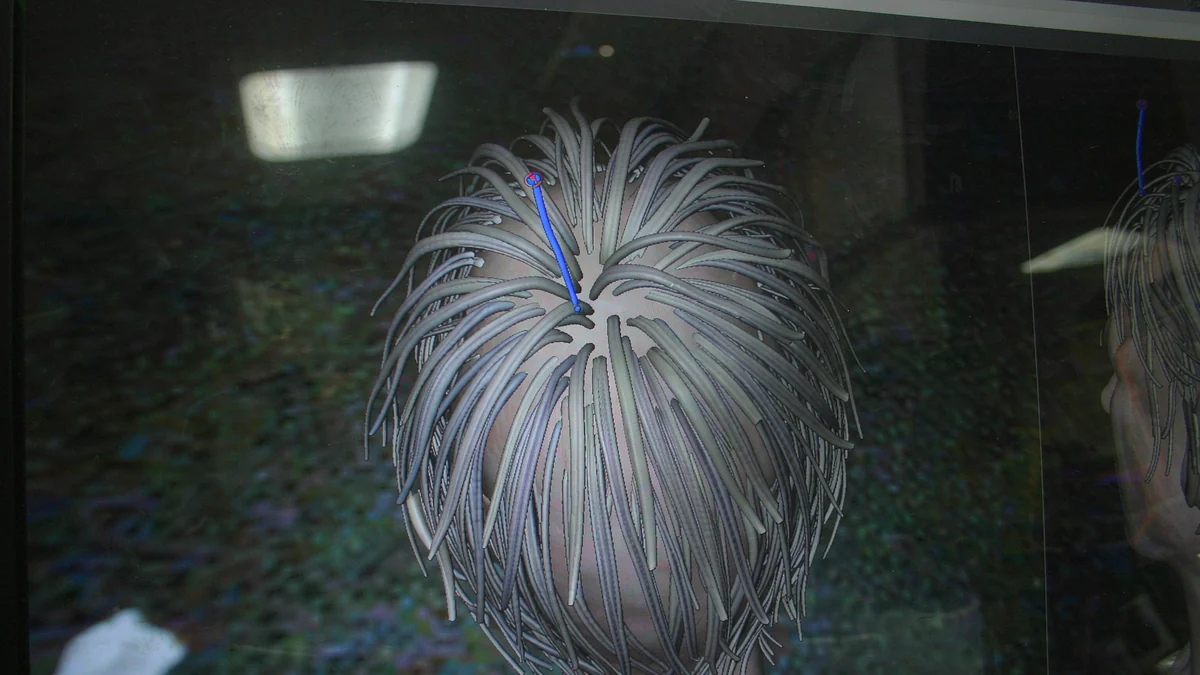
Preset hair is the fastest way to make a model look like everyone else’s. VRoid answers this with a brush. You draw a strand with the pen, and it becomes a hair mesh with its own parameters for thickness, taper, curl and bounce.
Each chunk tunes separately. So a fringe can come from six strokes instead of one modeled plane. That single feature is the difference between a template and a character.
But hair is also where file size and frame rate go wrong. Every strand is geometry. An avatar with forty hand-drawn chunks runs heavier than one with twelve. The difference shows up as dropped frames in your streaming software, not as anything visible in the editor.
Build the silhouette with about a dozen chunks. Let texture carry the fine strands.
Clothes: layer before you design
Outfit creation is the weakest corner of the free workflow. Layering is the workaround. VRoid ships templates for shirts, jackets, skirts and shoes that can be combined and overlaid. Two templates on top of each other produce a silhouette neither had alone. The layered result then textures as one piece.
What you cannot do easily is build a garment that does not resemble the templates. A coat with unusual tailoring. Armor. Anything with dramatic asymmetry.
That is the point where people either simplify the design or move the mesh into Blender.
Textures and the pen that makes them work
The texture editor takes pressure input from a drawing tablet. It keeps layers. It draws on the 3D model and its UV map at the same time. On iPad it accepts Apple Pencil.
If you already draw, this is the familiar part. It is also the part that makes the model look like yours rather than like a preset with new colors.
If you do not draw, spend the first week on hair and eye textures. Leave the body alone. Those two carry almost all of a character’s identity at webcam distance.
A plain body with distinctive eyes and a clean fringe reads as designed. An elaborate body with generic eyes reads as a template. Viewers decide which one they are looking at in under a second.
The expressions your face tracking will use
An avatar that cannot blink looks dead on stream. This is where the expression editor earns its place. VRoid exposes the standard set: joy, anger, sorrow, fun, blink, and the eye-direction channels. You shape each one by dragging vertices and sliders inside the same editor, not by hunting for morph targets in another program.
Two rules matter more than the rest. Keep the blink subtle. An exaggerated blink reads as a wink at stream resolution, so the model appears to malfunction every four seconds. And test every expression in your face-tracking software before you record anything.
That second rule has a specific cause. Some tools map their own labels onto VRM’s preset expressions and silently drop whatever they do not recognize. You will not see an error. You will see a model that never frowns.
Lip sync is the other half of feeling alive. VRoid exports the standard vowel shapes, and most setups drive them from webcam input rather than from your voice. The consequence is odd: the mouth moves when your head moves, and sits still while you talk off-camera.
If clean lip sync matters, drive the mouth from the audio feed and let the camera handle the head. It is a setup detail, not a modeling one — but it decides whether the avatar reads as alive or as a puppet with a moving picture taped to its face.
Exporting, and what a VRM file actually is
Export writes a VRM file. VRM is a glTF-based format built specifically for humanoid avatars. Its reference implementation ships as a Unity package. That detail matters more than it sounds.
Some avatar and face-tracking tools read VRM directly. VRChat does not. It wants a Unity project with its own SDK, so a VRoid export becomes a Unity import before it becomes an avatar.
VRoid Hub is the official shortcut. Upload the model there and integrated platforms can call it up without a file conversion. That is also where other people can see the model and send it appreciation, which matters more for a debut than most people expect.
If the goal is a streaming setup rather than a VRChat avatar, check what your face-tracking software accepts before you build. Rebuilding a finished model for a different pipeline is a lost weekend. It is the single most common way first projects stall.
What you can actually sell
This is the part worth reading twice rather than skimming. Textures and hair meshes you draw yourself belong to you outright. The preset meshes, clothing items and accessories are pixiv’s, licensed to you rather than handed over. That is why the base models are explicitly not CC0.
The license is a permission slip, not a transfer of ownership. For items carrying no special clause, pixiv permits commercial use by individuals and corporations. The list is broader than most people expect.
You may sell the exported model data. You may stream and monetize appearances. You may edit the model in other software. You may sell items you modified from presets.
Prints, posters, acrylics and shirts are allowed, and so are figures made from the model. Paid commissions are fine. So is teaching with the software, or using it to demonstrate a drawing tablet on camera for a sales video.
The prohibitions are narrower than the permissions. You cannot ship an application that generates VRoid-derived avatars without a separate license from pixiv. You cannot redistribute the software itself. You cannot use it for purposes other than creative output, with listed exceptions for education, process streams and device demonstrations.
Some individual preset items carry their own clauses that override the general rule. Those are marked in the license panel. If an item is marked, read the marking before it goes on a model you plan to sell.
This is the one step people skip. It is also the only step with a real downside.
Where VRoid stops and Blender starts
Three limits appear once the novelty wears off. Topology is not meaningfully editable, so a model cannot be optimized for a specific game engine. Rigging stays on the standard humanoid skeleton, which means tails, wings and extra limbs need outside work. And the material system is simple, so stylized lighting effects require leaving the app.
None of those matter for a talking-head streamer.
All three matter if the avatar is going into a game, where poly count and bone count are budget items rather than details.
VRoid or Live2D
These solve different problems. The choice is about your art pipeline, not about quality.
Live2D takes a 2D illustration and rigs it into a puppet. It preserves the drawn look exactly, and it costs money. I covered that side separately in what Live2D Cubism actually charges for.
VRoid builds a 3D model from presets and brush strokes. It is free, and it turns with the camera. Whether that is the entire point or completely irrelevant depends on your channel.
Choose Live2D if your identity is one specific drawing and you want it to stay a drawing. Choose VRoid if you want to move in 3D or cannot draw well enough to make a 2D model look right. Choose neither if you are not going to stream regularly. A static illustration with a wobble effect is cheaper than either, and nobody in your chat will file a complaint.
If drawing is the weak link either way, the same logic applies to the rest of your software stack. I wrote about finding free alternatives to paid tools for the cases where the paid app is not the actual bottleneck.
What I would do first
Download it. Pick a body. Spend the first hour on the face alone. If the face reads as your character, everything after it is ordinary work. If it does not, no amount of hair will fix it, and you have learned that for the price of an hour.
Then export one VRM and import it into whatever your streaming software uses, before you build a second model. The pipeline is where first projects die. Finding out early costs an afternoon instead of a month.
Finally, screenshot the license panel of every preset item you use. Not because pixiv is going to chase you. Because the day a model gets popular is the day you want that record to already exist.
The whole toolchain is free. The only real risk is spending three weekends on an avatar that cannot leave the editor because you never tested the export. Test it first — before the hair, before the clothes, before the second model.